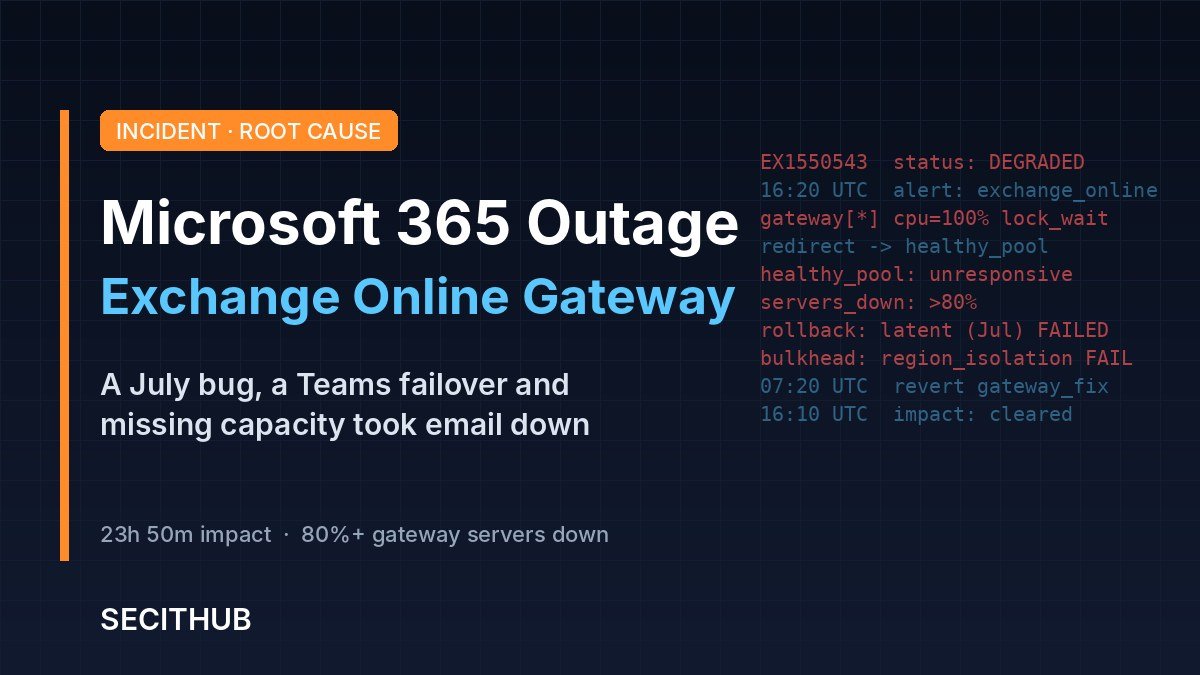
The Microsoft 365 outage that began on November 12, 2026 was not a cyberattack. It was a bug that had sat quietly in Microsoft’s network gateways since July. In its preliminary post-incident report, Microsoft says three problems lined up at the worst moment. Together they cut most users off from Outlook and Exchange Online for almost 24 hours, and dragged Teams, Copilot, SharePoint and a dozen other services down with them.
The story matters beyond one bad day for email. It shows how a single shared front door can take down a whole cloud suite. It shows how safety systems built to absorb failure can spread it instead. And it shows how fast attackers turn a real outage into a phishing lure.
What Happened During the Microsoft 365 Outage
Almost a full day of impact
Microsoft’s report puts the start at 16:20 UTC on Thursday, November 12. Customers stopped feeling active impact at 16:10 UTC on Friday, November 13. That is 23 hours and 50 minutes. Mail backlogs kept clearing into Saturday, and Microsoft sent its final customer update early on November 14.
Email first, then everything that depends on it
Most users could not reach their mailbox in Outlook or any other mail client, and many messages arrived late. The report lists a long chain of affected services:
- Exchange Online, Outlook and Outlook on the web
- Teams, Copilot, SharePoint and OneDrive
- Defender, Purview, Intune and Fabric
- Planner, Power Apps, Power BI, To Do and Universal Print
A global footprint
The BBC counted disruption in at least 70 countries. In the UK, NHS staff, schools and courts felt it, while officials said emergency lines kept working. Canadian hospitals and US court services also reported problems. Microsoft called it “a technical issue not related to cyber or AI/agents” and apologized.
One shared front door jammed, and email stopped for almost everyone behind it.
The Three Failures Behind the Outage
Microsoft says no single cause would have been enough. The damage came from three conditions meeting at once on the networking gateway that sits in front of many Microsoft 365 services.
1. A latent bug from July
In July, Microsoft rolled out a fix built specifically for its gateway servers. That fix carried a hidden defect. Under heavy load, it caused lock contention inside an internal Windows process, which then burned through CPU and memory. The change ran worldwide for more than three months without any visible trouble.
2. A routine Teams failover
About 15 hours before the outage, Teams traffic moved automatically from its alternate gateway onto the primary one. That primary gateway also serves Exchange Online. The shift raised the load and changed the traffic mix. Microsoft describes this kind of failover as normal.
3. Capacity already missing
Nearly 14% of gateway capacity was already offline because of an unrelated issue the day before. On its own, Microsoft says, the remaining headroom would have been enough. Combined with the other two factors, it was not.
Why testing missed it
Microsoft did test the July change. But its load tests used a different traffic mix and older hardware with fewer cores. The bug gets worse on newer machines with more cores, which is exactly what production runs. The lab simply did not look like the real world.
How Safety Systems Spread the Failure
Redirection made it worse
Requests piled up during US peak hours until servers stopped responding. Automatic traffic redirection then did its job and moved the load to healthy servers. Those servers hit the same bug and failed in turn. At the lowest point, more than 80% of gateway servers were unresponsive.
Regional walls did not hold
Microsoft builds bulkheads between regions so that one region’s problem stays local. A separate issue broke those bulkheads, and the failure went global. Microsoft has not yet explained that issue. It says the final report will.
Why recovery took a full day
Engineers restarted servers, but queued traffic overwhelmed them the moment they came back. Microsoft admits its automated recovery “was not designed” for such a broad unresponsive state. Normal rollback tools also failed, because the bad change was months old. In the end, teams pulled large groups of servers offline, often half a region at a time, applied the revert and restarted them.
What we still do not know
This is a preliminary report, so some gaps remain. Microsoft promises answers on three points in its final review:
- Why the regional bulkheads failed and let the problem spread worldwide
- What knocked 14% of gateway capacity offline the day before
- Which long-term changes it will make to testing and change control
Until then, treat any detailed claim beyond the report as speculation.
The failover worked exactly as designed. That is what took the service down.
Attackers Moved Faster Than the Fix
The outage was not an attack, but it quickly fed one. On November 13, Microsoft Threat Intelligence spotted a phishing campaign built around the disruption. The fake emails posed as Microsoft 365 service notices and even cited EX1550543, the real incident ID.
The lure claimed that messages were held during the outage and would be deleted within 24 hours. A large “Restore Messages” button led to a credential phishing page. Security firms also reported fake password reset texts and support calls using the same theme. This is the same playbook we covered in our guide to phishing simulations: urgency, authority and a believable detail.
What IT and Security Teams Should Do Now
Microsoft has already reverted the gateway code, added capacity and set guardrails on traffic distribution. Its final report, with the full repair list, is due on November 20. Your side of the work starts now.
- Warn users about outage phishing. Tell staff that Microsoft never asks them to “restore” held mail through a link. Block or flag messages that cite EX1550543.
- Check sign-in logs from November 12 to 14. Look for logins from new locations or devices after users clicked outage-themed messages.
- Save the incident record. Keep the EX1550543 and MO1550821 notices from the admin center for service credit claims and audits.
- Set up a backup channel. Agree on an approved way to reach staff and customers when Outlook and Teams are both down.
- Map what depends on Exchange. Identify alerts, workflows and AI agents that rely on Exchange or Microsoft Graph, and give them a degraded mode.
- Read the final report. Check whether the bulkhead failure or the repair items change your own resilience plan.
The deeper lesson is about concentration. Exchange Online could not route around its main gateway, so when that layer failed, email failed for nearly everyone. The same week brought outages at the FAA, banks and Apple, which we unpacked in why a week of US tech outages was not a cyber attack.
Microsoft will fix its gateway. It cannot fix your dependence on it. That part belongs to every organization that runs its day on one provider, and it is worth planning for before the next bad change lands.
Want to see how a single configuration error took down another giant? Read our deep-dive on Cloudflare’s November 18 outage.
Plan for the day your cloud goes quiet, before attackers fill the silence.

Microsoft’s preliminary report names three factors: a latent bug in a July fix for its networking gateway servers, extra load from a routine Teams failover, and nearly 14% of gateway capacity already offline from an unrelated issue.
No. Microsoft says it was a technical issue not related to cyber activity or AI agents. Attackers did, however, use the outage as a phishing lure.
Microsoft records active customer impact from 16:20 UTC on November 12 to 16:10 UTC on November 13, 2026, about 23 hours and 50 minutes. Mail backlogs kept clearing into November 14.
Exchange Online and Outlook were hit hardest. Teams, Copilot, SharePoint, OneDrive, Defender, Purview, Intune, Planner, Power BI and other services that depend on Exchange were also disrupted.
Fake Microsoft 365 service notices cite the real incident ID EX1550543 and claim that held messages will be deleted within 24 hours. A Restore Messages button leads to a credential phishing page.
Microsoft set November 20, 2026 as the target date for its final review, including a full list of repair items and an explanation of why the regional bulkheads failed.
Sources
Microsoft 365 Preliminary Post Incident Report (EX1550543), reproduced by Office Watch
Microsoft Rules Out Cyberattack in Outage, Warns of Phishing Campaign – SecurityWeek
Microsoft outage: a cascading failure that started with an undetected bug – Network World